
"Your Roofing | Best Roofer in Town" can get the profile suspended.
Last updated November 19, 2026
Google Business Profile optimization, step by step
Google Business Profile optimization means making your free Google listing complete, accurate and active. Google says complete, accurate profiles are more likely to show up in local search when nearby customers look for what you do.
YB
Your BusinessVerified · Roofing contractor
WebsiteCallDirections
Roofing contractor
Open today 7am to 6pm
Serves the north side and 4 towns
Repairs, re-roofs and inspections listed
Replies to every review
Photos of real jobs, added monthly
Profile complete
Illustration, not a real profile.
The checklist
How do you optimize a Google Business Profile?
Short answer
You optimize a Google Business Profile in nine steps, starting with verification. Every step below comes from Google's own guidelines.
- Verify your profileVerifying tells Google you're authorized to represent the business, so it's more likely to show up in search results.
- Use your real business nameExactly what's on your sign and your truck. No taglines, towns or services added.
- Pick the fewest categories that fitGoogle's rule: choose the fewest categories it takes to describe your core business.
- List every service you offerPick from Google's suggestions for your category or add your own, each with a short description. List the same services your website has pages for.
- Set an exact address or service area, and your hoursNo P.O. boxes or virtual offices. If you go to customers, set the area you serve.
- Write a description of what you doYour services, products, mission and history. No links, prices or sales, which Google doesn't allow in the description.
- Add photos and videosReal photos of your work, your team and your trucks show customers what they'll get.
- Ask every customer for a reviewSend a Google review link or a QR code. Never offer a discount or freebie for a review. Google strictly prohibits it.
- Reply to every reviewShort, personal and quick. Thank the good ones, and answer the bad ones calmly with what you'll do about it.
“For service-based businesses, a comprehensive list of offerings on your Google Business Profile is essential for visibility.”
Google, services.google.com, read November 19, 2026: GBP Best Practices Playbook 2026 (Services)
What about Products?
Some local SEO agencies also add their main services under Products, because that section shows high on the profile. Whitespark does this for its service clients, and says it may not keep working.
Google's product editor help says the editor suits local stores that sell physical goods, and that breaking its policy can remove every product you uploaded. Treat it as a test. Fill in Services first.
Want the bigger picture? What is local SEO covers how Google ranks local businesses, and the local SEO quick start for small business walks through the rest. Done with your profile? Our local SEO checklist has the other 20 checks, from listings and reviews to tracking.
What to avoid
What can get a Google Business Profile suspended?
Short answer
Stuffing keywords into your business name can get a Google Business Profile suspended. Virtual offices, duplicate profiles and paid reviews also break Google's rules.
“Including unnecessary information in your business name isn't permitted, and could result in the suspension of your Business Profile.”
Google Business Profile Help, support.google.com, read November 12, 2026: Guidelines for representing your business on Google
Not allowedYour Roofing | Best Roofer in Town, Call Now
Taglines, towns, services and phone numbers don't belong in the name.
AllowedYour Roofing
Your real name, as it appears on your sign. Services go in your services list, categories and description.
Google says a rented address you don't work from isn't eligible.
Google wants one profile per business.
Discounts or freebies for reviews count as fake content.
Reviews
How do you ask customers for Google reviews?
Short answer
Send every customer your Google review link or QR code right after the job. Google strictly prohibits offering free or discounted goods or services in exchange for reviews.
A review request you can text or emailSend it the same day the job is done.
Thanks for choosing [Business name]. If we did a good job, would you leave us a quick Google review here? [your review link]
Then reply to every review. Google's own tip for replies: keep it short and simple. Reviews are also what others say about you, one of the trust signals in our Google E-E-A-T guide for small businesses.
Where it sends people
What happens when someone taps Website?
Short answer
When someone taps Website, your site has to win the job. Lakeview Roofing gives every service and town its own page, so the tap lands on the exact answer.
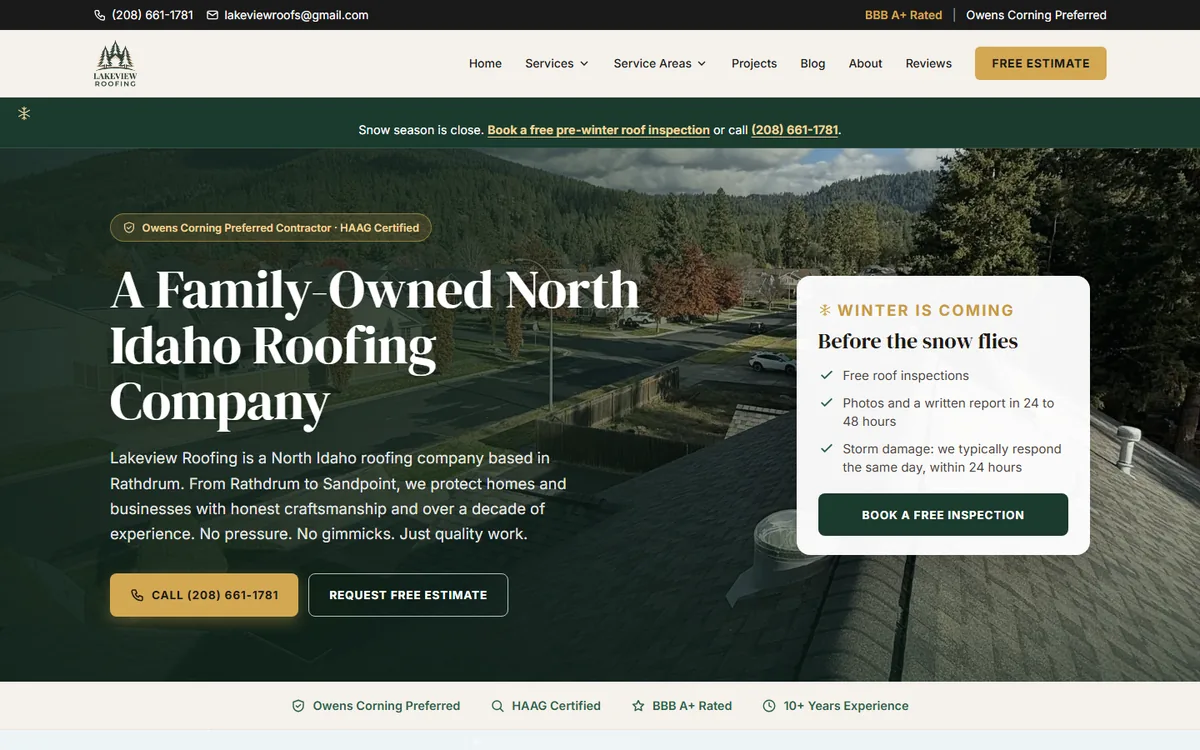
Roofing company, North Idaho
Lakeview Roofing
3.7xmonthly impressions, June to Oct
30,906Google impressions
Up 5spots in average position
Monthly Google impressions grew from 2,916 in June to 10,859 in October. Its average position moved up from 25.7 to 20.5 (lower is better).
What the site has
- A page for every service
15 service pages, each opening with the answer a customer is looking for.
- Service Areas pages
Rathdrum, Coeur d'Alene, Post Falls, Hayden, Spirit Lake and Sandpoint each get a page.
- A clear next step
The phone number and a Free Estimate button sit in the header of every page.
Source: Google Search Console, one site (lakeviewroofs.com), 90 days to November 10, 2026. Impressions are how many times a site showed up in Google results. Average position is where it showed up, where 1 is the top result. Page counts from its sitemap, November 13, 2026.
Starting from scratch? Here is how to build the website your profile needs step by step.
Done for you
Can someone build the website my profile links to?
Short answer
Yes, an AEO expert can build the website your Google profile links to. I build these on Halo, and you keep running the profile yourself.
You run your Google Business Profile. Halo is the AI website you run by text that builds the pages your profile links to.
- A page for every service on your profile, added by text and usually live in minutes
- Service area pages for the towns you list
- A lead form that texts you, so a profile tap turns into a call
- A sitemap, structured data and an AI-readable summary on every site
Texting HaloWe just added storm damage repair to our Google profile. Add a page for it.On it. I'll text you when it's live.It's live: yourbusiness.com/storm-damage-repair
Your AEO score, 0 to 100, updates as pages go live, with what to fix next.
The short version
Google Business Profile optimization: every answer in one place
How do you optimize a Google Business Profile?
You optimize a Google Business Profile in nine steps, starting with verification. Every step below comes from Google's own guidelines.
What can get a Google Business Profile suspended?
Stuffing keywords into your business name can get a Google Business Profile suspended. Virtual offices, duplicate profiles and paid reviews also break Google's rules.
How do you ask customers for Google reviews?
Send every customer your Google review link or QR code right after the job. Google strictly prohibits offering free or discounted goods or services in exchange for reviews.
What happens when someone taps Website?
When someone taps Website, your site has to win the job. Lakeview Roofing gives every service and town its own page, so the tap lands on the exact answer.
Can someone build the website my profile links to?
Yes, an AEO expert can build the website your Google profile links to. I build these on Halo, and you keep running the profile yourself.
Is a Google Business Profile free?
Yes, a Google Business Profile is free. Google says creating a Business Profile and listing your business on Google is free.
Should I add keywords to my business name?
No, keep keywords out of your business name. Google says unnecessary information in the name isn't permitted and could get the profile suspended.
How many categories should I choose?
Choose as few categories as it takes to describe your core business. That is Google's own rule for Business Profile categories.
Can I pay Google to rank my profile higher?
No, you can't pay Google for a better local ranking. Google says there's no way to request or pay for one.
Can I give customers a discount for leaving a review?
No, Google strictly prohibits offering incentives for reviews. Ask every customer with a review link or QR code instead.
Sources
Where these rules come from
- Guidelines for representing your business on Google support.google.com, read on November 13, 2026
- Tips to improve your local ranking on Google support.google.com, read on November 13, 2026
- Tips to get more reviews support.google.com, read on November 13, 2026
- Google Business Profile business.google.com, read on November 13, 2026
- Lakeview Roofing sitemap (page counts) lakeviewroofs.com, read on November 13, 2026
- Manage your services on your Business Profile support.google.com, read on November 19, 2026
- GBP Best Practices Playbook 2026 (Services) services.google.com, read on November 19, 2026
- About product editor support.google.com, read on November 19, 2026
- Google Business Profile guide: Products whitespark.ca, read on November 19, 2026
Finish the checklist, then fix the website.
Get the website built by an AEO expert, or check your current site free first.
Want an AEO expert to build it for you?
I build Halo sites for small business owners. Get in touch and tell me about your business. More in all small business guides